Hvelv Free
€0forever
- Local storage scan
- Agent runway estimate
- Safety evidence
- Manual reproducible-cache cleanup
- No scheduled or cloud actions
Hvelv finds developer storage that can move safely, explains what to do next, encrypts cold agent sessions with your key, and restores the one session you choose.
Not tied to one agent. Codex, Claude, and OpenCode are the first local adapters. The same evidence model is designed to extend across Grok, Kilo Code, Hermes, OpenClaw, and other coding tools.
NO DATA SENTHvelv joins filesystem, process, Git, and agent-session evidence before it presents an action.
| Storage | Evidence | Decision |
|---|---|---|
| Package and build caches | Inactive · reproducible | Safe to clean |
| Coding-tool worktrees | Git + adapter evidence | Review required |
| Named agent sessions | age encrypted · verified | Selective restore |
| OpenCode live database | Process currently active | Locked |
The workflow stays understandable even when your storage does not.
Estimate whether the Mac has enough memory, CPU, disk reserve, thermal headroom, and Docker capacity for the agents and build you intend to run.
Scan known developer locations and selected repositories. Active processes lock themselves automatically, regardless of which supported coding tool created the files.
Review evidence, then stream cold sessions through zstd and local age encryption to your own vault.
Open the encrypted catalog, select one session, verify every hash, and continue in its original harness.
Hvelv works where the files live. Cloud storage holds encrypted cold context; active databases and current sessions remain on your Mac. Before an agent starts, the local runway estimates safe concurrency for subagents, builds, and Docker, then returns actionable remediation through the same MCP evidence model.
See system requirements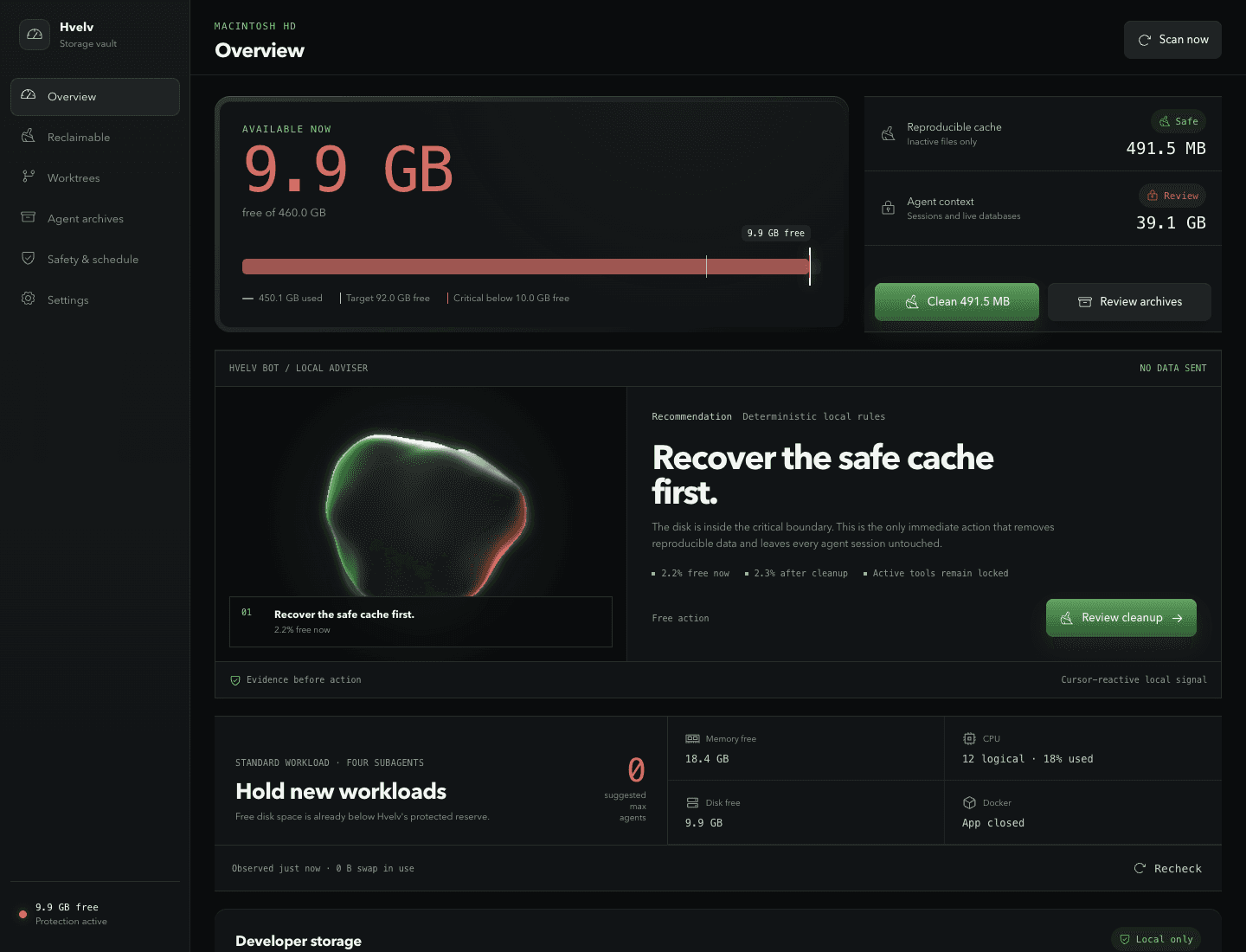
Hvelv gives two audiences the desktop application's evidence and actions without the window: developers who prefer a terminal, and coding agents that need structured output. It runs the same code as the desktop tabs and keeps the same safety model. An agent can read, plan, and request through the command line; only a person at the desktop or at an interactive terminal can delete.
hvelvDisk headroom, reclaimable total, active locks, the next maintenance window, and your Hvelv+ state.hvelv runway --agents 4 --buildSafe, constrained, or unsafe — with a suggested concurrency — before you start the agents.hvelv scan --jsonThe same model the desktop receives over IPC, in one envelope an agent can parse.Installed from Settings. It ships inside Hvelv.app and updates with it, so there is no second download and no second update path. Cleanup still executes only after a person types yes at an interactive terminal.
The free app handles today’s storage pressure. Hvelv+ keeps the pressure from returning.
€0forever
€5+one time · you choose
Clear answers about cleanup, cloud archives, worktrees, encryption, resource readiness, and coding-tool compatibility.
Hvelv identifies inactive, reproducible developer caches and presents the exact path, size, process evidence, and recovery behavior before cleanup. Sessions, active databases, and unfinished work stay locked unless you explicitly archive or review them.
Codex, Claude, and OpenCode are the first local adapters. Hvelv uses standard Git and MCP boundaries so Grok, Kilo Code, Hermes, OpenClaw, and other tools can be added without weakening the same safety evidence.
Yes. Hvelv streams a selected cold session through compression and local age encryption, uploads it to your Backblaze B2, Cloudflare R2, or rclone-compatible vault, and keeps an encrypted catalog so you can restore that named session later.
Only after a desktop review proves the worktree is clean, unlocked, pushed, tracked upstream, and no longer tied to an active agent session. Dirty, unpushed, locked, or ambiguous worktrees remain protected.
The private encryption identity and provider credentials stay in macOS Keychain. Cloud storage receives encrypted objects and an encrypted catalog, not readable prompts, project paths, branch names, or session contents.
Hvelv includes an optional local stdio MCP server for inspection, scheduling, worktree evidence, encryption-key setup, and cleanup previews. Destructive or paid actions retain their desktop approval and license boundaries.
Yes. The local readiness check combines current memory, swap, CPU load, thermal state, protected disk reserve, build overhead, Docker state, and declared per-agent requirements. It returns a conservative safe, constrained, or unsafe assessment with a suggested concurrency ceiling and remediation codes; it never promises exact performance.
Download Hvelv Free for Apple Silicon. Upgrade only when scheduling, cloud restore, worktree actions, or MCP control earns its place.